Station Locations in Wavelog and POTA

GERMAN VERSION BELOW — DEUTSCHE VERSION UNTEN
While some radio amateurs mainly operate from their home shack and maybe have worked from 10 different locations in their entire life, there is also the other faction. The busy souls, the antenna-handicapped at their home QTH, the outdoor operators.
The latter don’t just have radio contacts from 5 locations in their lifetime; in doubt, that “quota” is already used up after a week. There are even people who make it their mission to activate 30 POTA parks within a single day. That’s 30 locations in just one day!
In Wavelog, unlike in other loggers, the information about your station’s location during an activity is not saved with every single QSO, but centrally in the station locations.
This has the advantage that you don’t have to enter all the details one could possibly record — and there are quite a lot of them — for EVERY single QSO. Instead, you create a location and simply log, import, or assign your QSOs into it.
But that also means, especially for these outdoor operators, that they would have to create 30 station locations for just one day of operation. Among other things for POTA parks they will probably activate only this one time in their life, with just 10 QSOs.
So of course the question comes up: Does it have to be that way?
Let’s take a closer look at this topic from all sides and discuss both the advantages and disadvantages.
How Wavelog is built
Wavelog is built — and that logic is also deeply anchored in its code and database structure — around the concept that every physical location gets its own station location in Wavelog.
This is where all important data is stored: especially the locator and, for the outdoor faction, also the award program data such as POTA, SOTA, GMA, or COTA.
On top of that, additional data is stored here as well. Depending on the DXCC, this can include things like province data, prefectures, information about other country subdivisions that may also be relevant for awards. In addition, there is, for example, the QSL message for eQSL (more on that later) and various integrations such as QRZ, Clublog, etc.
Once you have done all of that and import or log your QSOs, everything takes its course. Automatic jobs send out electronic QSLs like LotW, eQSL, and many more, and in the statistics functions you can always see exactly what you have done. For example, from where you activated in “activated locators” or “worked distances”.
But of course, this approach also has disadvantages for very mobile radio amateurs: suddenly their user in Wavelog has 200 station locations. And that CAN become confusing in the default setup.
Two things help here:
- Activating the option “Station Location Quickswitch” in the user settings, followed by marking the important “home locations”, such as the home QTH or the local park, as favorites. This is done in the station setup dialog by clicking the star icon for these main locations.
This creates a new dropdown menu next to your username, where you can quickly find these favorited station locations that you constantly need and switch to them with a single click.
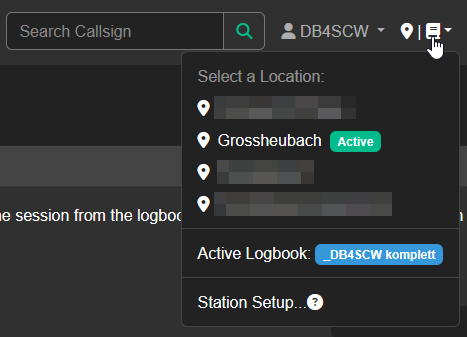
- Consistent naming of your locations. Names like “POTA DE-0028 Spessart JN49pu Wintersbach forest edge” don’t just make it easier to find a specific location via the search function in the station setup dialog, but also in all dropdown lists (e.g. during ADIF import), even when you have a large number of station locations.
In that case, it’s also not a big deal if there’s another entry like “POTA DE-0028 Spessart COTA DL-03227 JN49or Großheubach”, because the POTA park is large enough to span multiple grid squares.
What you could do, but shouldn't
Now, you might also get the idea of creating a “generic” location. Something like “Portable Activities” as a name, and then just entering a dummy locator there — for example your home locator, in my case JN49.
Then you could simply import all QSOs into that one location, maybe add some comments for yourself, and call it a day.
Yes — in principle, nobody can stop you from doing that. No SWAT team is going to show up at your apartment and make you disappear if you do ;)
Still, I’d like to give you two reasons why you might not want to do this — followed by a workflow that at least mitigates what I consider the biggest downside and makes this approach somewhat “acceptable” for me.
Reason #1: Your statistics partially become useless
From Wavelog’s perspective, every QSO would then have that one single locator, POTA reference, etc.
Which immediately means: several of Wavelog’s statistics features become unusable for you. Evaluations like “activated locators”, “worked distances”, and similar reports will all show incorrect data, because everything now points to that “dummy locator”. And it’s not just the statistics — things like the displayed distance within a QSO or the placement of your TX QTH on the map view will also be wrong.
On top of that, award tracking can become tricky. For example, if an award requires all QSOs to be within a certain radius and you actually operated from outside of it.
That said, you might not care about all of this. Maybe having a cleaner, more manageable dataset is more important to you. But then there’s also…
Reason #2: You’re forcing incorrect data onto your QSO partners
You’re probably wondering: how so?
Let’s take a look at a comparison between two QSOs. Both are FT8, which effectively means I exchanged callsign, 4-digit locator, and signal reports with my QSO partners. JA5GYU (left) has not confirmed via LotW yet, while JA8DIV (right) has.
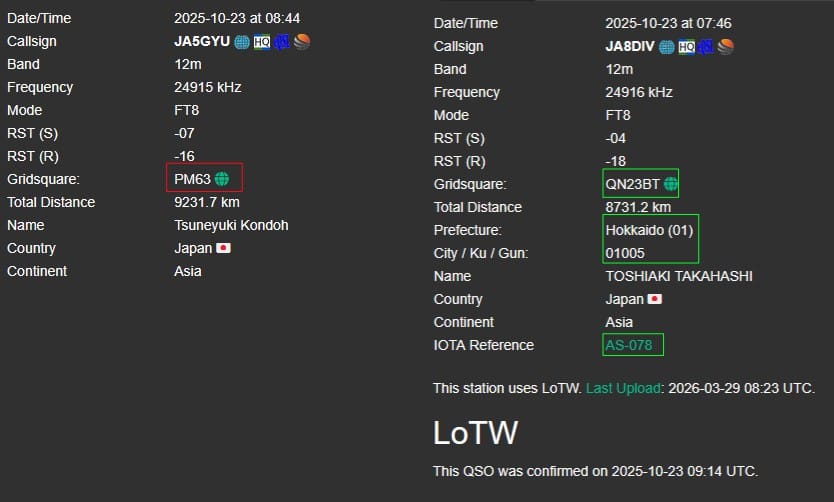
As you can see, the locator suddenly becomes six digits long. In addition, my QSO now includes prefecture data, a Ku number, as well as the IOTA reference for the island of Hokkaido. I didn’t enter any of that — this data comes purely from the LoTW confirmation by JA8DIV, who kindly logged and shared that information (whether in his Wavelog station location or within the corresponding data structure of his logging software).
So what does this mean for generic locations?
Let’s say I operate portable from JO30mv, but import my log into my generic location with JN49or. During the activation, my QSO partner correctly logs me as JO30mv. Then my LoTW confirmation goes through — and suddenly, because of my incorrect data, I overwrite his correct information with the wrong locator, JN49or.
And the comment where I may have stored the correct details? He will never see that.
How can I handle this broken data situation?
Only with the following workflow:
-
Disable LoTW, eQSL, etc. in the crontab manager if you’re an admin — or time your input for a moment when electronic confirmations are not being generated.
-
Open your generic location. Adjust ALL data to match the portable activity you’re about to log or import.
-
Import the data.
-
Record the location data again in the comment field via mass update in the advanced logbook.
-
Manually trigger the upload to LoTW and the like. This way, you are sending out the correct data.
-
Reset the location data afterward — or leave it as-is until your next activity.
-
Re-enable your crontab if you disabled it in step 1.
This way, you send out the data correctly — your QSO partners receive accurate information. And if you can live with the reduced data accuracy on your side, you can simply change the location data again afterward.
The problem: If you already have historical data, this workflow becomes difficult to apply. Wavelog always sends “everything that hasn’t been sent yet” in one go. That means your LoTW, Clublog, etc. need to be fully up to date at that moment.
a word about eQSL
Urgh! 🤮
Jokes aside — let’s go into this properly.
eQSL has one major weakness — no… actually two. The first is that it stores your password in plain text, which makes it an absolute security nightmare. More on that in this blog post (German only, apologies. Google translate should work fine though).
The second one is this: for every new location in Wavelog, you would also have to create a new profile in eQSL with a new “nickname”. So far, that’s still somewhat compatible with Wavelog. BUT…
eQSL does not allow more than one profile for the same callsign at the same time.
Which means:
I make a QSO from home — locator JN49or. For that, I need one profile.
I make a QSO from somewhere else — locator JO30. Now I would have to deactivate my home profile (by setting an end date) and create a new one.
Then I make another QSO from home. Now I would have to end the JO30 profile (again, by setting an end date) and create a new home profile with a new start date. I CANNOT reactivate the old one!
That alone is already insane — but it gets even worse: it effectively means I’m not allowed to operate from two or more locations on the same day, because the time ranges of the profiles must not overlap (!!!).
So here’s my advice:
Write the correct data into the QSL message for eQSL at the station location — and in this one specific case, use a single profile with a dummy locator.
In the QSL message, you can then include something like:
“thx for QSO POTA DE-0028 & DE-1211 @ JN49or”
And honestly, that’s fine — eQSL awards don’t really count for much anyway, and the confirmations from eQSL, unlike LoTW, don’t contain data like locators that could overwrite anything. So you can put whatever you want in there — you won’t break your QSO partner’s data via eQSL.
Why can’t Wavelog be adapted so I can define all that stuff per QSO?
As someone who has both dug pretty deep into the Wavelog code and already contributed to it myself:
Because this whole location logic is basically the foundation of all of Wavelog. Changing that would be like replacing the foundation or the basement of a house that has already been fully built.
It would effectively be a complete redevelopment of the entire software, because this logic is baked into almost every single function.
in conclusion
As always, there are two ways to go about it for the dedicated outdoor operator:
- For the best data quality and the simplest handling:
Create a station location for each place. It’s quick and easy using the copy function — and it will cause you the least amount of trouble later on. - If you want to minimize the number of locations and don’t care as much about data quality for yourself:
Use a generic location for places you don’t operate from often — but PLEASE, PLEASE, PLEASE make sure to follow the workflow described above. Do NOT force incorrect data onto your QSO partners.
That’s it.
I wish you all great portable activations and a ton of fun with the hobby!
73 de Stefan, DB4SCW
GERMAN Version / Deutsche Version
Während manche Funkamateure hauptsächlich aus dem heimischen Shack arbeiten und vielleicht in ihrem Leben an 10 verschiedenen Orten Funkbetrieb gemacht haben, gibt es da noch die andere Fraktion. Die umtriebigen Seelen, die am Heim-QTH Antennengeschädigten, die Draussenfunker.
Letztere haben nicht nur Funkkontakte an 5 Standorte in ihrem Leben, im Zweifel ist dieses "Kontingent" nach einer Woche bereits aufgebraucht. Es gibt manche Menschen, die es sich sogar zur Aufgabe machen, 30 POTA Parks innerhalb eines Tages zu aktivieren. Das sind dann 30 Standorte an nur einem Tag!
In Wavelog ist es nun so, dass im Gegensatz zu anderen Loggern die Infos über den Standort deiner Station während einer Aktivität nicht an jedem QSO mit gespeichert wird, sondern zentral in den Stationsstandorten.
Das hat den Vorteil, dass du nicht alle Details, die man so erfassen kann (und da gibt es durchaus viele) an JEDEM einzelnen QSO eintragen musst, sondern du einen Standort anlegst und einfach dort hinein deine QSOs erfasst, importierst oder zuordnest.
Das heißt aber auch, gerade für diese Draussenfunker, dass diese im Zweifel für nur einen Tag Betrieb 30 Stationsstandorte erfassen müssten. Unter anderem für POTA-Parks, die sie wahrscheinlich nur dieses eine Mal in ihrem Leben mit nur 10 QSOs aktivieren werden.
Da stellt sich natürlich die Frage: Muss das?
Lasst uns das Thema mal ausführlich von allen Seiten beleuchten und Vor- wie Nachteile diskutieren.
Wie Wavelog gebaut ist...
Wavelog ist so gebaut und auch im Code und in der Datenbankstruktur tief verankert konzipiert, dass für jeden physikalischen Standort auch ein Stationsstandort in Wavelog angelegt wird.
An diesem werden dann alle wichtigen Daten erfasst - v.a. der Locator und für die Draussenfraktion auch wichtig: die Daten zum Diplomprogramm wie POTA, SOTA, GMA, oder COTA.
Zusätzlich werden hier noch weitere Daten erfasst. Vor allem je nach DXCC, Dinge wie Provinzdaten, Präfekturen, Angaben zu anderen Einteilungen von Ländern die alle ggf. für Diplome relevant sind. Zusätzlich gibt es außerdem z.B. die QSL-Message für eQSL (mehr dazu später) und verschiedene Anbindungen wie QRZ, Clublog, etc.
Wenn du all das getan hast und deine QSOs importierst oder erfasst, geht alles seinen Weg. Automatische Jobs versenden elektronische QSLs wie LotW, eQSL und vieles mehr und du kannst in den Statistikfunktionen jederzeit genau sehen, was du gemacht hast. Beispielsweise von wo du aktiviert hast in "aktivierte Locator" oder "gearbeitete Entfernungen".
Aber natürlich hat dieses Vorgehen bei sehr mobilen Funkamateuren auch Nachteile: Plötzlich hat ihr User in Wavelog 200 Stationsstandorte. Und das KANN im Standard unübersichtlich werden.
Abhilfe schaffen zwei Dinge:
1) Das Aktivieren der Option "Stationsstandort-Quickswitch" in den Benutzereinstellungen, sowie das darauffolgende Markieren der wichtigen "Heimstandorte" wie das Heim-QTH oder der Hauspark als Favorit. Dies erfolgt im Stationssetup-Dialog durch Anklicken des Sternsymbols zu diesen Hauptstandorten.
Dies erzeugt eine neues Dropdownmenü neben eurem Usernamen, in der ihr diese favorisierten Stationsstandorte, die ihr dauernd braucht, schnell findet und mit einem Klick umschalten könnt.
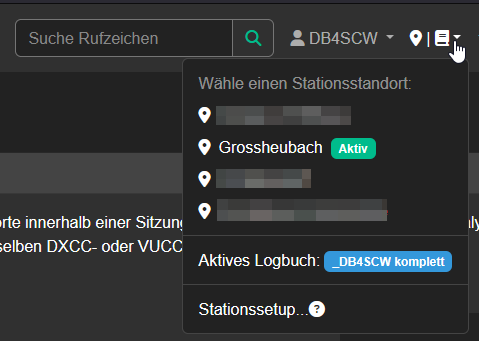
2) Das konsequente Benennen der Standorte. Namen wie "POTA DE-0028 Spessart JN49pu Wintersbach Waldrand" erleichtern das Finden eines spezifischen Standortes nicht nur über die Suchfunktion im Stationssetupdialog, sondern auch in allen Dropdownlisten (z.B. beim ADIF-Import) selbst bei größeren Stationsstandort-Anzahlen. Dann ist es auch wenig schlimm wenn es noch ein "POTA DE-0028 Spessart COTA DL-03227 JN49or Großheubach" gibt, weil der POTA Park so groß ist, dass er mehrere Planquadrate überspannt.
Was man machen könnte, aber nicht machen sollte
Nun könnte man aber auch auf die Idee kommen, einen "generischen" Standort anzulegen. Mit einem Namen wie "Portabelaktivitäten" und dort einfach einen Dummylocator einzutragen wie z.B. den Heimlocator - bei mir JN49.
Dann könnte man ja einfach alle QSOs dort importieren und für mich selbst mit Kommentaren versehen und gut.
Ja - grundsätzlich kann dich niemand davon abhalten. Kein SWAT-Team wird in deine Wohnung kommen und dich verschwinden lassen, wenn du es tust.
Ich möchte dir trotzdem 2 Gründe erklären, warum du das vielleicht NICHT tun willst, gefolgt von einem Workflow, der zumindest den für mich schlimmsten Hinderungsgrund ausgleicht und dieses Vorgehen für mich "vertretbar" macht.
Hinderungsgrund 1: Statistikinformationen werden teilweise wertlos
Für Wavelog hat dann jedes QSO nur diesen einen Locator, POTA-Ref, etc.
Das heißt aber auch für dich sofort, dass einige Statistikfunktionen von Wavelog für dich unbrauchbar werden. Solche Auswertungen wie "aktivierte Locator", "gearbeitete Entfernungen" und Co. werden alle falsche Daten anzeigen, da diese nun auf den "Dummylocator" referenzieren. Und nicht nur die Statistiken, auch solche Dinge wie die Anzeige der Entfernung im QSO selbst oder die Platzierung des Sende-QTH auf der Kartenansicht wird falsch sein.
Außerdem könnte Awardtracking schwierig werden, wenn z.B. ein Diplom voraussetzt, dass alle QSOs in einem gewissen Radius stattfinden müssen und du von außerhalb gefunkt hast.
Das alles könnte dir aber ggf. egal sein bzw. die Übersichtlichkeit deiner Daten könnte dir wichtiger sein. Aber dann gibt es noch...
Hinderungsgrund 2: Du zwingst deinen QSO-Partnern falsche Daten auf
Du fragst dich jetzt sicher - wie das?
Schauen wir uns dazu den Vergleich zwischen 2 QSOs an. Beides in FT8, bedeutet effektiv ausgetauscht habe ich mit meinem QSO-Partner Callsign, 4 stelliger Locator und Rapporte. JA5GYU (links) hat bisher nicht per LotW bestätigt, JA8DIV (rechts) schon.
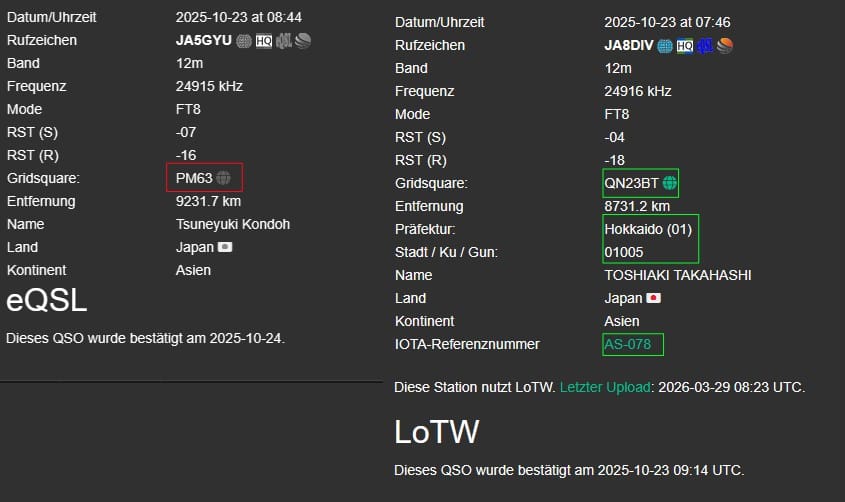
Wie du siehst, ist der Locator plötzlich sechsstellig, zusätzlich erhält mein QSO Präfekturen, Ku-Nummer, sowie die IOTA-Referenz der Insel Hokkaido. Nichts davon habe ich eingegeben, diese Daten stammen rein aus der LotW-Bestätigung von JA8DIV, der diese Daten netterweise mit erfasst hat (in seinem Wavelog-Stationsstandort oder in der entsprechenden Datenstruktur seines Logprogramms).
Was heißt das nun für generische Standorte?
Angenommen ich arbeite Portabel aus JO30mv, importiere mein Log aber in meinen generischen Standort mit JN49or. Während meiner Aktivität hat mich dieser Funkamateur völlig richtigerweise mit JO30mv geloggt. Dann läuft meine LotW-Bestätigung und plötzlich überschreibe ich durch meine Falschangabe seine richtigen Daten mit dem falschen Locator, JN49or. Meinen Kommentar, wo die richtigen Daten drin stehen, bekommt er aber nie zu sehen!
Wie kann ich das mit den falschen Daten umgehen?
Ausschließlich mit folgendem Workflow:
- Deaktiviere LotW, eQSL und Co im Crontab-Manager wenn du Admin bist, oder time deine Eingabe zu einer Zeit, in der die elektronischen Bestätigungen NICHT laufen.
- Öffne deinen generischen Standort. Passe ALLE Daten auf die portable Aktivität an, die du gleich erfassen oder importieren möchtest.
- Importiere die Daten.
- Erfasse die Standortdaten "nochmal" im Kommentarfeld per Massenverarbeitung im erweiterten Logbuch
- Führe den Versand der Daten an LotW und Co manuell aus. Somit versendest du die richtigen Daten.
- Stelle die Daten am Standort zurück oder lasse ihn bis zur nächsten Aktivität so stehen.
- Aktivere deinen Crontab wieder, solltest du ihn in Punkt 1 deaktiviert haben.
Damit versendest du die Daten richtig - deine QSO-Partner bekommen korrekte Daten. Und wenn du mit der Datenungenauigkeit klar kommst, kannst du dann hinterher diese Daten wieder im Standort ändern.
Problem: Hast du schon Vergangenheitsdaten, kannst du diesen Workflow schlecht anwenden, denn Wavelog versendet immer "alles was ich noch nicht versendet habe" am Stück. Das heißt dein LotW, Clublog, etc. muss zu dem Zeitpunkt "auf Stand" sein.
Ein Wort zu eQSL
Urgs! 🤮
Spaß beiseite, jetzt ausführlich.
eQSL hat eine große Schwäche - nein... zwei. Die erste ist, dass es euer Passwort in Klartext speichert und damit ein absoluter Sicherheitsalbtraum ist. Mehr zu dem Thema in diesem Blogbeitrag.
Die zweite ist - für jeden neuen Standort in Wavelog müsstest du auch in eQSL ein neues Profil mit einem neuen "Nickname" anlegen. Soweit, so kompatibel mit Wavelog. AAAABER...
eQSL lässt nicht zu, dass zu einem Callsign zum selben Zeitpunkt mehr als 1 Profil existiert.
Bedeutet:
Ich mache ein QSO von daheim - Locator JN49or. Dafür brauche ich ein Profil.
Ich mache ein QSO von woanders - Locator JO30. Dann müsste ich das Profil von daheim deaktivieren (in dem ich das Enddatum entsprechend setze) und ein neues Profil anlegen.
Dann mach ich wieder ein QSO von daheim. Dann müsste ich das JO30 Profil beenden (also Enddatum eintragen) und ein NEUES Profil für daheim anlegen mit neuem Startdatum. Das alte kann ich NICHT reaktivieren!
Allein dass ist schon Wahnsinn - noch wahnsinniger wirds, dass das bedeutet, dass ich an einem Tag nicht an zwei oder mehr Orten funken darf, weil sich die Zeiträume für die Profile nicht überschneiden dürfen(!!!!).
Deshalb mein Rat: Schreibt die richtigen Daten in die QSL-Message für eQSL am Stationsstandort und benutzt HIER AUSNAHMSWEISE ein einziges Profil mit Dummylocator. In der QSL-Message kann dann sowas stehen wie "thx for QSO POTA DE-0028 & DE-1211 @ JN49or"
Ist auch nicht schlimm - die eQSL-Awards zählen sowieso effektiv nichts UND die Bestätigungen von eQSL enthalten im Gegensatz zu LotW keinerlei Daten wie Locator, die man überschreiben könnte. Da darf also alles drinstehen, ihr macht eurem Gegenüber die Daten mit eQSL nicht kaputt.
Warum kann man Wavelog nicht so anpassen, dass ich den ganzen Kladderadatsch pro QSO festlegen kann?
Als jemand der im Wavelog-Code schon sowohl tief rumgestöbert wie auch selbst schon dazu beigetragen hat:
Weil diese Logik mit den Standorten quasi das Fundament von ganz Wavelog ist. Das zu ändern wäre, wie bei einem fertig gebauten Haus das Fundament oder den Keller zu tauschen.
Es wäre effektiv eine komplette Neuentwicklung der ganzen Software, da diese Logik quasi fast in jeder Funktion steckt.
Fazit
Wie immer führen 2 Wege nach Rom für den geneigten Draussenfunker:
1) Für beste Datenqualität und einfachstes Handling:
Leg jeden Stationsstandort an. Geht einfach und schnell über die Kopieren-Funktion und macht dir hinterher am wenigsten Stress.
2) Wenn du so viele Standorte wie möglich sparen willst und dir Datenqualität FÜR DICH SELBST nicht so wichtig ist:
Mach einen generischen Standort für die Orte, wo du nicht oft bist, benutze aber BITTE BITTE BITTE unbedingt den oben beschriebenen Workflow. Zwinge deinen QSO-Partnern bitte NICHT falsche Daten auf.
So. Das wars. Ich wünsch euch beste Portabelaktivitäten und wahnsinnig viel Spaß beim Hobby!
73 de Stefan, DB4SCW