The CBR Import in Wavelog - Why and How [English]
Often, the question "what is the CBR import in wavelog and why do I need that?" is asked. This blog post examines the why and how of this feature

Let's walk through a "post-contest" workflow in wavelog while we discuss parts of the "why"-part of the question. This blog is using the process as it is implemented in version 2.2.2.
Let's imagine a contest. The exchange is Serial-No, DOK and 4-digit Gridsquare. For me, that would be "59 001 B04 JN49". Let's also assume I logged this in N1MM+ and exported an ADIF file, as well as the Cabrillo file to upload to the contest sponsor. I'll only use CBR as the abbreviation of Cabrillo from now on.
After importing the ADIF file in wavelog, you'll see the following message:
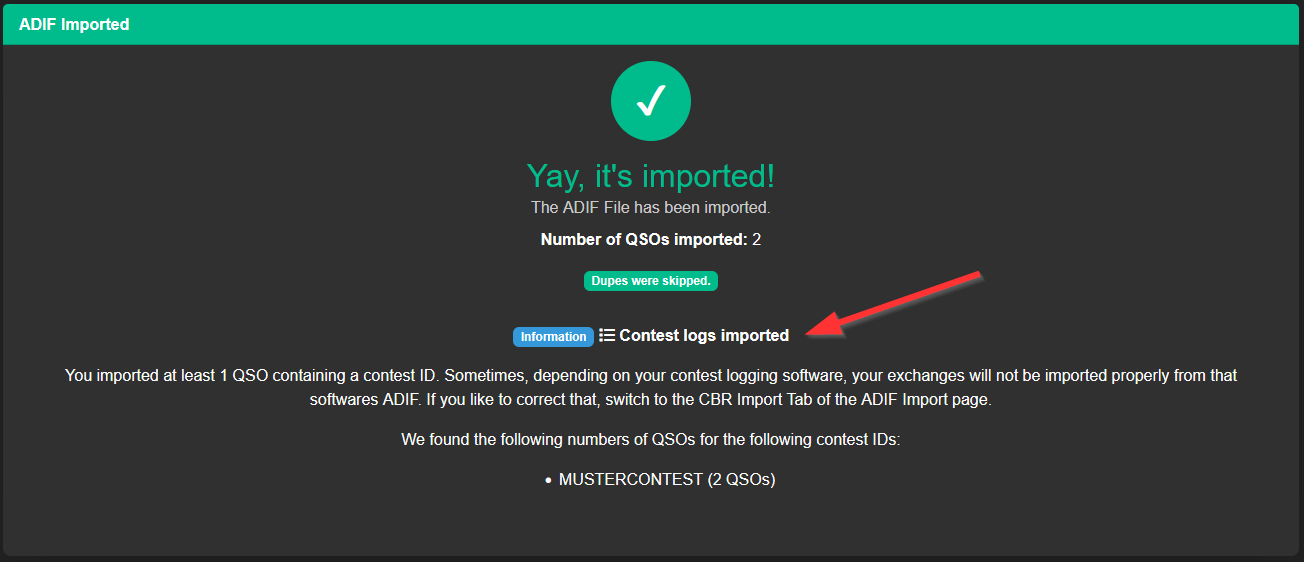
The infoscreen mentions that your exchanges may not be properly imported. And we can see that in the logbook view - the DOK and Gridsquares seem to be missing:

So, to fix this, head over to ADIF Import/Export again, switch to the CBR-import tab, fill out the form there and import the CBR file you got from N1MM+. While you can import as many times as you like with different options until it looks right, please read the options carefully!
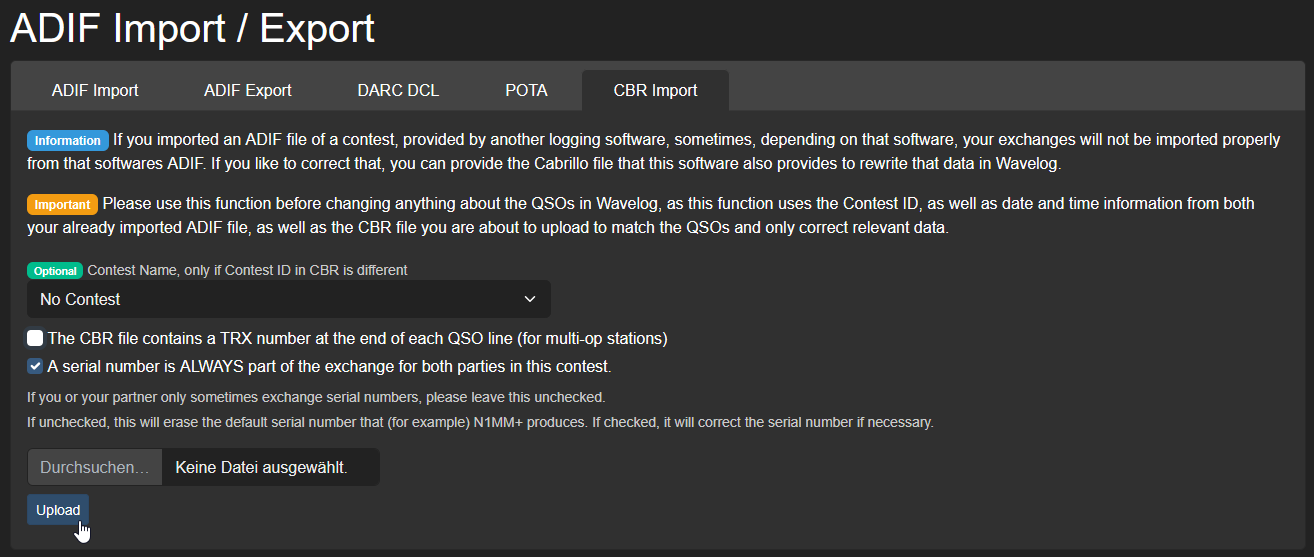
Afterwards, we see the full exchange in the logbook view:

Now the biggest question...
Why?
Why do we need that and can't I just import the CBR instead of the ADIF?
To answer this question, we need to understand what fields in our logbook software we use for contest logging. Any logger that adheres to the ADIF standard to store data (which should be everyone) should use the following fields for our sample contest:
| field name | usage | example data |
|---|---|---|
| DOK | our QSO partners DOK | D23 |
| GRIDSQUARE | our QSO partners locator | JO30 |
| SRX | received serial number | 17 |
| STX | transmitted serial number | 35 |
| SRX_STRING | received exchange | D23 JO30 |
| STX_STRING | transmitted exchange | B04 JN49 |
The problem is that loggers such as N1MM+ do provide the the first 4 fields, but not the last 2. Their rationale is that these would be redundant information, because the info is already provided in DOK and GRIDSQUARE separately. But neither does the ADIF informs us which of the provided fields are part of the contest exchange, nor in which order.
This is why the CBR import exists - in that format, we get told what the exchange was and which order it has to be in. So we import the CBR file to get that information and complete the data for wavelog to display.
Now the question that gets asked often after understanding this: "Why don't we skip the ADIF import alltogether and just import the CBR alone?"
The answer is simple. The CBR format provides only the bare minimum data to analyze a contest and is not "complete".
Lets compare! Here are both contacts in ADIF format (top left and top right) and in CBR format (below, starting with "QSO:").
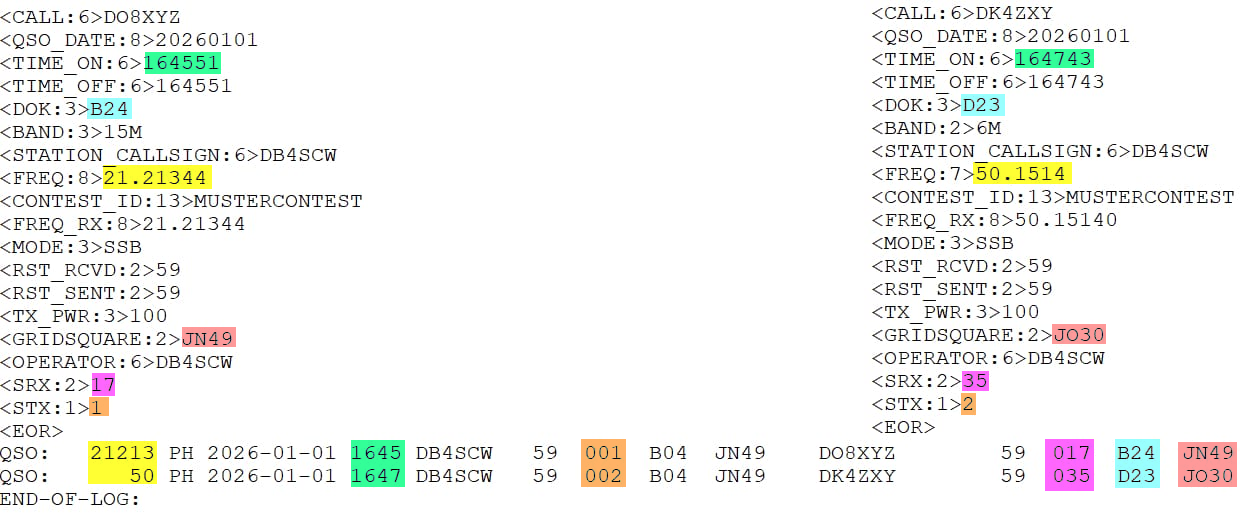
These are information that are present in ADIF, but not in CBR (at least not fully):
- TIME: We only get hours and minutes in CBR, not seconds
- MODE: We only get "PH" in CBR for phone/SSB. Some loggers even provide USB or LSB in their ADIF (N1MM+ does not)
- MODE: the only valid modes in CBR are PH, FM, CW, RY (for RTTY) and DG (for every other digimode under the sun). Especially for DG, we would have no idea which mode was used if we just imported the CBR file
- FREQ: We loose all information after full kHz, so "21.21344" gets shortened to "21.213"
- FREQ: On bands starting with and above 6m, we loose the frequency alltogether, only getting generic markers such as "50" for 6m and "1.2G" for 23cm QSOs, even if we logged these correctly down to the last Hertz
- OPERATOR: We get no operator on a per-QSO basis in CBR, only an overall list of operators in the CBR header
- Exchange: While we see the complete contents of the exchange and all its parts in CBR (which we want), we do not get any info inside the CBR what this is. So using the CBR only, we would have no idea that "D23" is a DOK, for example.
Also, there is information which is NOT present in the ADIF, but included in the CBR:
- Sent exchange: In the ADIF, we only have the sent serial number. The sent exchange of my DOK and Grid is never mentioned.
This is why we need a 2-step process:
First, import the ADIF to get the information into our log as fine-grained as possible, then use the CBR to get context information about what the exchange content and order was and fill in this missing information.
Only together (ADIF + CBR) we get the full, complete picture of everything that went down.
I hope that cleared up all the questions about this feature and you have fun using it for your contest logs.
Btw: If you log the contest in wavelog itself, you don't need to do any of that. Wavelog will fill out all the fields correctly for you without the need to correct anything!
73 de Stefan, DB4SCW